Your code knows everything.
But nobody checks it before it’s rolled out.
If you manage infrastructure as code, the answer to every question is in the repository: Which machines are on this network? Where is SSH reachable from the internet? Which secrets have a default value in the code?
In practice, the answer is still: search, read an outdated wiki page, ask a colleague. Security is supposed to assess what it isn’t allowed to see. And when internal audit asks who approved which change, the search through chat histories begins.
Free and open source
For teams that want to see, understand and check their infrastructure code. Unlimited repositories and users, licensed under AGPL-3.0.
stackwerk on GitHubA map of your infrastructure
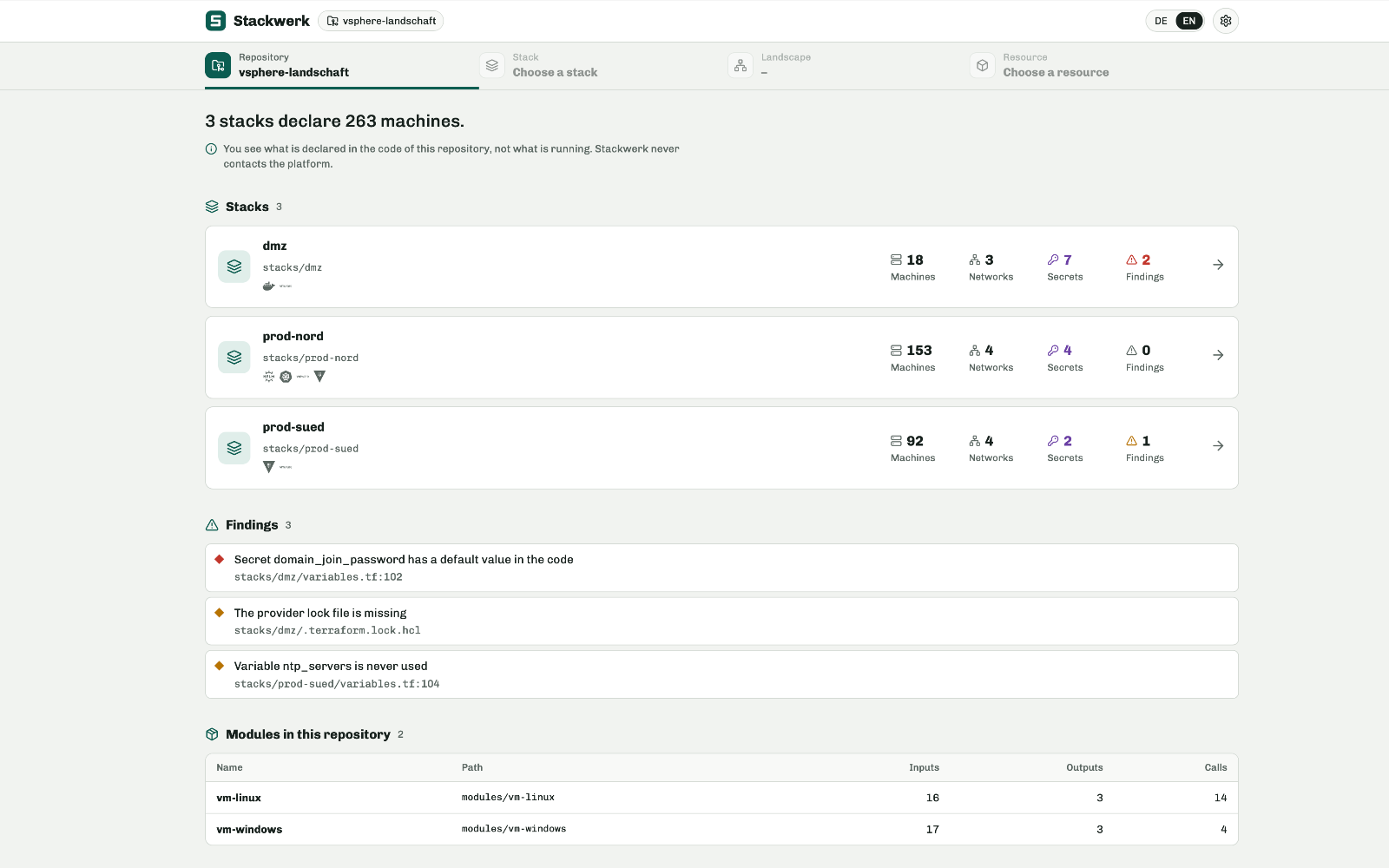
Five levels, from the big picture to a single resource: Overview, Repository, Stack, Landscape, Resource. Machines grouped by network, cluster, zone or tag, with vCPU, memory, operating system and backup coverage. The matching code is always one click away, with the line highlighted.
Anything the code doesn’t determine – such as variables that only the pipeline sets – stackwerk marks as unknown instead of guessing.
One rule set for all providers
26 built-in rules catch what should be fixed before the next apply: SSH, RDP or databases reachable from the internet, publicly readable storage, unencrypted disks, secrets with default values, providers without a version constraint.
A single rule for “SSH reachable from the internet” checks AWS security groups and Google Cloud firewalls alike. You write custom rules in JSON, not in code. Every finding names the file and line. Anything that can’t be decided with certainty is marked “uncertain” – never “OK”.
Understand changes before they’re rolled out
Branch against main, commit against commit: stackwerk shows which machines are added, removed or made bigger – not the text diff, but the declared change.
Email notifications planned
New critical findings or a failed repository fetch are emailed to the people responsible. Topics by category, recipients by role.
Runs on your own network
A small, hardened container without root privileges, written in Go. Run it with Docker, with the Helm chart on Kubernetes or as a service. Sign-in through your identity provider. Your data stays with you; there is no cloud service and no connection to HOPPLIN.
Enforce,
follow up,
prove
For organizations that don’t just need to know their rules but have to enforce them – and show who did what. For example, for ISO 27001, NIS2 or internal audit. Pro runs on the same open core; nothing is taken out of the free version.
stackwerk Pro will be released after stackwerk v0.1. You can sign up for a pilot project now.
Request a pilot-
01
The pipeline asks before it deploys
Before every apply, your pipeline sends the repository and commit to stackwerk. stackwerk fetches exactly that state, applies the rules and returns a verdict: pass or fail. No code is uploaded, and no credentials leave the pipeline.
Security decides how much weight each rule carries. Operations decides at which severity the pipeline stops – per repository and environment, for example strict in production and lenient in test.
-
02
Exceptions with justification and expiry date
Not every finding is a mistake. A port that is open on purpose is accepted as an exception: with a justification, for a specific object, and with an end date no more than one year out. After that, the finding comes back. This turns “we already know about that” into a documented decision.
-
03
Findings become tasks planned
One click turns a finding into an issue in GitHub, GitLab or Jira – with the rule, the affected resource, the line of code and guidance on fixing it. A person always makes the call; stackwerk never creates anything automatically.
A board shows all tasks across your repositories. And it shows what no ticket system can: when a ticket has been closed but the finding is still in the code. Jira knows whether someone closed a ticket. stackwerk knows whether the problem is fixed.
-
04
Audit log and compliance report
Every sign-in, every change, every pipeline check and every exception is recorded in a tamper-evident chain. The compliance report sums this up per environment for a period you choose: findings, exceptions, activity and the state of the log. That’s the document you hand to your auditors.
planned Only the dedicated auditor role will be able to view it – deliberately not the administrator. Whoever manages the system shouldn’t be auditing themselves.
-
05
Roles by repository and environment
Teams see what concerns them: repositories and environments are assigned through groups in your identity provider. One team’s production stays invisible to another.
-
06
Notifications in Teams, Slack and via webhook planned
In addition to email: Microsoft Teams, Slack and webhooks for your own systems. Selectable per topic, sent to roles rather than individuals. More delivery channels, such as Amazon SES, will follow.
-
07
Maintained rule sets for your requirements planned
Rule sets mapped to NIS2, BSI IT-Grundschutz (the German federal IT security baseline) and ISO 27001, maintained by HOPPLIN and updated regularly. They give you the check, not the certification – but they tell you which requirement a finding touches.
Also in Pro
- Commercial license instead of AGPL obligations
- Support requests straight from the app – you see the diagnostic data before it is sent
- Image and Helm chart from a private registry, including for environments without internet access
- Colors per tag, so you can tell environments and owners apart at a glance
stackwerk and stackwerk Pro
Pro builds on the free version. What is free stays free.
| Feature | stackwerk | stackwerk Pro |
|---|---|---|
| See | ||
| Five-level map down to the line of code | included | included |
| Profiles for vSphere, AWS, Google Cloud, Kubernetes and Helm; custom module profiles | included | included |
| Search across all repositories, wall display | included | included |
| Branch and commit comparison of declared changes | included | included |
| Colors per tag | not included | included |
| Check | ||
| 26 built-in rules, provider-neutral | included | included |
| Custom rules in JSON, adjustable severities | included | included |
| Security page with open, uncertain and accepted findings | included | included |
| Maintained rule sets mapped to NIS2, BSI IT-Grundschutz and ISO 27001 | not included | planned |
| Enforce | ||
| Pipeline check with thresholds per repository and environment | not included | included |
| Exceptions with justification and expiry date | not included | included |
| Follow up | ||
| Email notifications | planned | planned |
| Notifications via Teams, Slack and webhook | not included | planned |
| GitHub, GitLab and Jira tickets from findings | not included | planned |
| Board that matches tickets against findings | not included | planned |
| Prove | ||
| Tamper-evident audit log with export | not included | included |
| Compliance report per environment and time period | not included | included |
| Dedicated auditor role, separate from the administrator | not included | planned |
| Access and operations | ||
| Sign-in via Keycloak, Entra ID, Google, GitLab, authentik and Okta | included | included |
| Roles per repository and environment | not included | included |
| Container, Helm chart, CLI, pipeline hook | included | included |
| Image and chart from a private registry | not included | included |
| License and support | ||
| License | AGPL-3.0 | Commercial, per user |
| Support | Community on GitHub | Requests from within the app, contract optional |
| Price | Free | Per user per year, on request |
Who it helps
| Who | What stackwerk does | What Pro adds |
|---|---|---|
| IT management | An up-to-date picture of your own landscape, without anyone maintaining slides. | Control you can demonstrate to internal audit, insurers and auditors. |
| DevOps and platform teams | Every resource down to the line of code; understand changes before the merge. | Rules in the pipeline instead of the wiki, roles per team. |
| Security and SecOps | Findings across all providers, without a single production password. | Set severities that the pipeline enforces; track findings as tasks. |
| Administrators (vSphere and cloud) | The overview you know from the console, built from the code. | A notification in your team’s channel when something is on fire. |
| Audit and data protection | – | Their own access to the log and report, separate from the administrator. |
How stackwerk Pro is licensed
Ask us for the price per user per year.
- Per user per year
- Every active account counts, including accounts that sign in through the identity provider. Wall displays don’t count.
- No lockout if you go over
- More users than licensed? Nothing gets locked; the difference is billed at renewal.
- Verified offline
- The license is a signed file. stackwerk Pro doesn’t need a connection to HOPPLIN.
- No data loss when it expires
- After a grace period, the Pro features switch off; the map and rules keep working, and the audit log stays readable and exportable.
- Also available through partners
- IT consultancies and system integrators can resell stackwerk Pro to their clients. Ask us for the terms.
From the developers
who build stackwerk.
Setup
Installation with your Git server, certificate, reverse proxy and identity provider. The result: a running instance and short operations documentation.
Fixed price, agreed in advanceRules workshop
We translate your security policy into rule sets, severities and thresholds, and integrate the pipeline check into your CI.
Scope agreed in advanceFrom vCenter to code
Running VMware vSphere without infrastructure code? We import your environment into OpenTofu, organize it into stacks and hand over a repository whose plan runs with no differences.
Nach AufwandCustom extensions
Missing a provider, a view or a rule? We build it for you – usually as part of the open-source project, so updates don’t leave you stuck on a custom version.
Nach AufwandTraining
Infrastructure as code with OpenTofu, structuring your repositories, working with stackwerk.
Half or full day, on-site or remoteFor day-to-day operations: a dedicated contact and guaranteed response times.
| Feature | Community | Support contract |
|---|---|---|
| Channel | Public issues on GitHub | Directly with HOPPLIN, including from within the app |
| Response time | No commitment | Guaranteed by contract |
| Confidentiality | Public | Confidential |
| Help with updates | – | Included |
| Price | Free | Per year, on request |
You talk to the people who build it
- We write the code
- You talk to the developers, not to a reseller.
- We run it ourselves
- Git, identity providers, containers and registries are part of our daily work.
- We’re based in Germany
- HOPPLIN GmbH, Kaufering. Contracts under German law, support in German and English.
Short answers
Does stackwerk need access to our vCenter or our cloud?
No. It only reads Git repositories, using a key that has read-only access.
Does it display passwords or other secrets?
No. stackwerk shows which secrets are used and where they are set. It never reads the values – not in tickets or notifications either.
Where is the data stored?
With you. stackwerk and stackwerk Pro run on your network. There is no cloud service.
How much does stackwerk cost?
The free version costs nothing, with no limit on repositories or users. stackwerk Pro is licensed per user per year.
Does the pipeline check replace our existing scanners?
It complements them. The difference: the rules are the same ones your team sees and maintains in stackwerk, and they apply the same way across vSphere, AWS, Google Cloud and Kubernetes.
Does stackwerk replace a ticket system?
No. stackwerk creates tasks in your ticket system and shows their status. The work still happens in GitHub, GitLab or Jira.
Does stackwerk Pro make us NIS2 or ISO 27001 compliant?
No – no tool can promise that. stackwerk Pro provides the checks and evidence you need for these requirements.
Does it work with Terraform and OpenTofu?
Yes, with both.
Does stackwerk replace monitoring?
No. It shows what is declared, not what is currently running.
Which processor architectures is the image available for?
Intel/AMD (amd64) and ARM (arm64) by default. We can provide other architectures on request.